Data Analysis with AI 02: Prompting
From Prompting to Context Engineering
2026-02-22
The AI course
This slideshow is part of my data analysis with AI material.
Check out the course website gabors-data-analysis.com/ai-course/
About me and this slideshow
- I am an economist and not an AI developer, expert, guru, evangelist
- I am an active AI user in teaching and research
- I teach a series of Data Analysis courses based on my textbook
- This project is closely related to concepts and material in the book, but can be consumed alone.
- This slideshow was created to help students and instructors in economics, social science, and public policy who do data analysis
- Feedback is welcome.
Motivation
Human Agency
- We don’t want to produce fully automatic products
- Everyone can do it
- Not specific to YOU or YOUR project
- You have agency to make decisions
- We want to build workflows that are repeatable and shareable
- Understand how to design them well
Part 1: Why Context Engineering
The Big Picture: 2024 → 2026
- 2024: “Prompt engineering” was the key skill.
- 2025: Rise of “context engineering”.
- 2026: Context engineering + agentic workflows.
What changed?
- Models became much better at literal instruction-following.
- Context windows became much larger.
- Tool use became normal, not exceptional.
What Is Context Engineering?
“The delicate art and science of filling the context window with just the right information for the next step.” — Andrej Karpathy
It is not only about wording prompts. It is about choosing the right combination of instructions, data, tools, and constraints for the task.
Context = More than Prompts
Prompting (narrow view)
- System prompt
- User message
- Maybe a few examples
Context Engineering (full view)
- Instructions and constraints
- Reference materials
- Memory / history
- Tool definitions
- Retrieved documents (RAG)
- Environmental state
Example Specification
One motivating specification is:
- Schooling and wages (OLS): estimate returns to schooling in a log(wage) regression.
Why this specification?
- It is transparent enough to isolate prompting and context effects.
- It still supports realistic diagnostics, robustness checks, and interpretation risks.
Part 2: Canonical Workflow First
Canonical Workflow for Empirical Tasks
Recommended protocol for empirical tasks:
- Scope: define objective, audience, and output.
- Context: provide data and methodological constraints.
- Execute: run analysis in clear substeps.
- Verify: test code, outputs, and assumptions.
- Document: record prompts, checks, and decisions.
Workflow Walkthrough: Schooling and Wages (OLS)
- Scope: “Estimate wage returns to schooling for policy audience.”
- Context: data dictionary, variable units, expected signs.
- Execute: clean data -> OLS with robust SE -> table.
- Verify: check coefficient signs, N, and standard errors.
- Document: save final prompt and model specification.
Step 2 in Practice: System Prompt Template
- Core ideas
- To help reproduce
- alternative is not bad: AI makes its own assumptions
- varies more by model
Step 2 in Practice: System Prompt Template
What would you add?
Step 2 in Practice: System Prompt Template: One way
You are assisting with empirical economics research.

Objective:
[one-sentence goal]

Data context:
- Dataset: [name]
- Key variables: [list]
- Unit of observation: [e.g., individual]

Method constraints:
- Preferred language: R
- Required method: [OLS + robustness checks]
- Must report: robust SE, N, R^2, key diagnostics

Output format:
- Publication-ready table
- Brief interpretation + limitations

Quality bar:
- Explain assumptions
- Include explicit validation checks
Part 3: Six Prompting Strategies in Practice
Prompting
- The focus is on workflow
- But good prompting helps get more of what we want
Strategy 1: Clear Instructions
Core principle: modern models are literal.
- “Analyze this data” is under-specified.
- Good prompts include audience, objective, method, and output format.
Prompt example:
- “Run OLS of log(wage) on education and experience with robust SEs; output a table and 3-sentence interpretation. It’s for the presentation of research paper”
If not specified
- the model will make its own assumptions, which may not match your needs.
- But often good. Like get correct SEs
- will require more iterations to get right.
Strategy 1: Implementation Tactics
- Specify audience (academic, policy, business).
- Specify method and constraints, not just topic.
- Ask for explicit output structure.
- Explain why the task matters.
- Use structured blocks or tags for long prompts.
Strategy 1: Structured Prompt Example (XML)
<context>
You are analyzing cross-sectional wage data.
</context>

<data_description>
Variables: wage, education, experience, female, age, industry
Sample: workers in 2025 survey, N=50,000
</data_description>

<task>
Estimate OLS of log(wage) on education and experience with robust SEs.
Report a publication-ready table and diagnostics.
</task>
Sidenote: Why XML for System Prompts?
Using XML tags in system prompts offers several practical benefits:
- Structure — clearly separates instructions, context, and examples
- Reliability — models recognize XML tags as meaningful boundaries
- Referencing — you can point back to specific sections by tag name
- Maintainability and iteration — easy to edit, swap, and hand off sections
Use XML when your prompt is complex – the structure pays off in reliability and maintainability.
Strategy 2: Provide References
Use references to ground outputs:
- Codebooks and data dictionaries.
- Methodology sections from papers.
- Sample output format to imitate.
Grounding details:
- Wage variable definitions, coding of education/experience, occupation rules, and sample inclusion criteria.
Strategy 2: What Changed Since 2024
- 2024: short contexts, frequent grounding failures.
- 2026: long contexts make full documentation practical.
Best practice now:
- Upload complete reference material when feasible.
- Ask model to cite variables and assumptions explicitly.
Strategy 3: Break Complex Tasks
Break into checkpoints instead of one giant request.
- Cleaning -> baseline OLS -> robustness and heterogeneity specs -> presentation-ready table.
This is not only about context limits. It is about error localization and better iteration.
Strategy 3: Why This Still Matters
Even with large context windows:
- Focused subtasks produce cleaner outputs.
- Intermediate checks catch mistakes early.
- Re-running one substep is cheaper than re-running everything.
Strategy 4: Reason Step-by-Step for Hard Choices
Use reasoning requests when method choice is non-trivial.
Ask for:
- assumptions,
- alternatives considered,
- why a chosen specification is preferred.
Example:
- Should we add occupation controls and a quadratic experience term?
Strategy 4: Reasoning Models and Limits
Reasoning-capable models are stronger at multi-step logic and coding, but:
- full internal reasoning is usually hidden,
- visible summaries can still contain errors,
- outputs still require external validation.
Use them for difficult specification choices, then verify with tests and diagnostics.
Strategy 5: Use External Tools
Do not rely on text-only answers for computational tasks.
Use tools for:
- running code (R/Python/Stata),
- reading files and metadata,
- web lookup when facts must be current,
- database access in larger projects.
Example:
- Run regression, subgroup estimates, and a coefficient plot with reproducible code.
Strategy 6: Test Systematically — the Pipe and the Water
Every data-analysis pipeline carries two things you can test:
| Pipe (code & structure) | Water (data & results) | |
|---|---|---|
| Nature | Deterministic — pass / fail | Probabilistic — plausible / suspect |
| Failure looks like | Error, warning, wrong type | Implausible sign, odd magnitude, unexpected N |
| Examples | PDF parser crash, mixed types in a column, silent row drops | Negative wage premium for education, SE larger than the estimate, distribution anomaly |
Strategy 6: Testing the Pipe and the Water
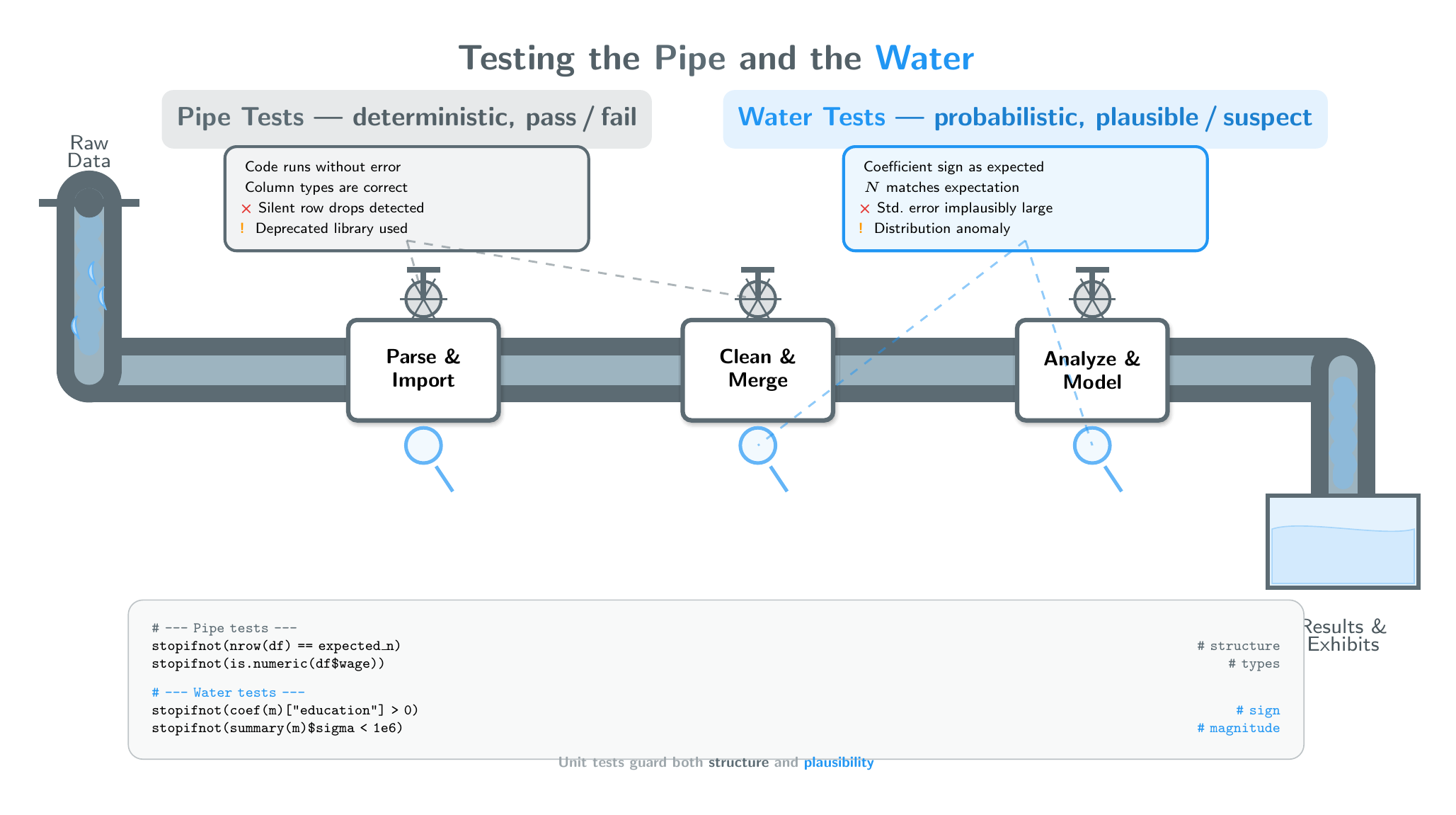
Strategy 6: Testing the Pipe
Structural and mechanical checks — if something is broken you should get a clear signal.
- Does the code run without errors or warnings?
- Are variable names, merges, and joins correct?
- Are observations dropped silently?
- Are libraries appropriate and versions pinned?
- Can the model explain each transformation step?
These are classic unit-test territory: the answer is yes or no.
Strategy 6: Testing the Water
Analytical and domain checks — there is a distribution of acceptable results, but you need anchors.
- Do coefficient signs match domain expectations?
- Is the magnitude in a plausible range?
- Is N what you expected after cleaning?
- Are standard errors and degrees of freedom reasonable?
- Are table/figure labels accurate?
- Can you replicate one key number by hand?
These range from hard constraints (a coefficient must be positive) to softer judgments (is this effect size surprising?).
Strategy 6 in Practice: Unit Tests — for Pipe and Water
Unit tests are yes/no assertions. Most guard the pipe, but the powerful ones also guard the water.
# --- Pipe tests (structure & cleaning) ---
stopifnot(nrow(df_wage) == expected_n_wage)
stopifnot(sum(is.na(df_wage$wage)) == 0)
stopifnot(is.numeric(df_wage$education))

# --- Water tests (results & plausibility) ---
stopifnot(coef(ols_wage)["education"] > 0)
stopifnot(summary(ols_wage)$sigma < 1e6)
stopifnot(summary(ols_wage)$df[2] > 30)
Ask AI to generate both kinds of checks, then run them before interpreting results.
Part 4: 2026 Capabilities That Change Prompt Choices
What Changed for Workflow Design
- Models follow instructions more literally.
- Long context enables full-document grounding.
- Agentic execution can chain many steps.
Result: less time on “clever phrasing,” more time on context design and verification design.
Agentic Workflows and Plan Mode
Plan mode pattern:
- Describe objective.
- Agent explores and proposes plan.
- You approve or edit plan.
- Agent executes.
Why it matters:
- Better architecture before coding.
- Lower token waste from rework.
- Better control on multi-file or complex analysis tasks.
Context Rot, Pollution, and Recovery
Long sessions can degrade quality:
- Context rot: loses key earlier constraints.
- Context pollution: irrelevant details distract.
- Context confusion: conflicting instructions accumulate.
Recovery pattern:
- Start fresh for new tasks.
- Save short written summaries between sessions.
- Reuse system prompt templates.
Skills and Reusable Commands
Reusable instructions (skills/gems/custom prompts) help with:
- consistency across sessions,
- sharable team workflows,
- faster startup on repeated tasks.
Think of them as analysis playbooks for AI workflows.
Preview: LATER (System Prompts and Skills)
Next week we extend this framework to:
- building strong reusable system prompts,
- creating skills for recurring data tasks,
- project-level context management patterns.
Part 5: Synthesis and Next Actions
Key Takeaways
- Context engineering is broader than prompt wording.
- Start with one repeatable workflow, then add strategy detail.
- Use the six strategies to prevent specific failure modes.
- Treat verification as mandatory, not optional.
- 2026 tools increase capability but also increase need for discipline.
- Separate core concepts from vendor-specific tricks.
Implementation Protocol for Applied Projects
Project setup:
- Write a one-sentence objective.
- Gather context documents (dictionary, assumptions, output example).
- Choose which workflow step you are currently in.
Project closeout:
- Run explicit verification checks.
- Document prompts and decisions.
- Record one limitation and one robustness check.
Core Resources
Course reference pages:
General documentation:
Appendix
Appendix A: Claude-Specific Prompting Tips
From Anthropic’s guidance:
- Be explicit; models take instructions literally.
- Use XML tags to structure long inputs.
- Provide motivation and decision context.
- Request output verbosity when needed.
- Enable extended thinking for complex tasks.
Appendix B: Gemini-Specific Prompting Tips
From Google’s guidance:
- Prefer simpler prompts over elaborate scaffolding.
- Use thinking levels for harder tasks.
- Place directives after large input blocks.
- Use long context for codebooks and documentation.
- Use grounding when factual freshness matters.
Appendix C: Agentic Coding Tool Examples
Examples:
- CLI tools: Claude Code, Codex.
- IDE tools: Copilot, Cursor, Antigravity.
Reference links:
Appendix D: Should We Say Please/Thank You?

Appendix D: Answer

Answer: It does not materially change output quality. Use the tone that feels natural.
Date stamp
This version: 2026-02-22 (v0.8.0)
Previous versions: v0.7.2 (2026-02-22), v0.7.1 (2026-02-16), v0.7.0 (2026-02-16), v0.6.0 (2026-01-19), v0.3.2 (2025-05-28), v0.1.2 (2025-04-21)
Gabors Data Analysis with AI – Prompting – 2026-02-23 v0.8.1